Object detection on Home-Assistant with Unifi Protect cameras and Deepstack
why
Ubiquiti’s 3rd generation security camera system is pretty neat. I’d call it prosumer grade gear. They’re moving their product portfolio towards a 4th generation, which has camera based object detection, but these, higher resolution/HDR cameras are crazy expensive.
I like to run household mission critical workloads on dedicated equipment and add value by integrating those workloads with a unified building management system (BIM) that simplifies the user experience and centralise and aggregates the data created by these Internet of Things (IoT) systems.
Home-Assistant is an important hub in my BIM, and it is complemented by services I run in Mini, our household compute/storage cluster.
Thus, deploying Ubiquiti’s Unifi Protect, on a small ARM PoE powered Ubiquiti Cloudkey and, some of their G3 cameras, provides a locally hosted security camera NVR that has a reasonably polished web and iOS interface.
To date I have pulled the RTSP camera streams directly into Home-Assistant’s Lovelace GUI, for display of camera feeds on our wall mounted tablet.
It would be much better if Home-Assistant knew what was in the images, and could notify and present actions based on the objects detected.
- Two cars parked in the driveway, one with an unknown license plate number
- person standing at the front door (not the cattle dog which regularly trips the Ubiquiti motion recording)
- Cat hunting our ringtail possum after dark
- dishes stacked next to the sink, after the dishwasher has finished a cycle
- Unknown faces at the front door
As with most of my home lab, there are less ridiculous methods to deploy, whilst still retaining most of the flexibility. You could use Raspberry Pi 4 for Home-Assistant, a Nvidia Jetson Nano for machine learning workloads, and a Synology NAS, or better yet, a home-brew TrueNAS server for storage and Plex etc. workloads. You can skip the Raspberry Pi, and run Home-Assistant on the NAS (and vis-a-versa), but in keeping with maintaining very high SLA with your household mission critical workloads, I think it makes sense to have dedicated kit. Be sure to have an effective backup/restore procedure in place.
how
Install custom Home-Assistant integrations to plumb the motion sensors in the Unifi camera system into automations, triggering Deepstack object detection, feeding back into home-assistant for consumption.
Variously Home-Assistant will then present actionable notifications to our mobiles etc., such as;
- Cat IS outside after dark, necessitating a fetch operation
- IF Cat detected on outside camera after dark
- present boxed image to iOS, labelling location (which camera),
- offer to turn ON outside lights
To make this magic work, I’ll be utilising the Unifi Protect Home-Assistant integration, and the Deepstack Home-Assistant integration. Both are non-offical, but can be easily installed with via Home Assistant Community Store (HACS).
guide/process
- Install Home Assistant Community Store (HACS)
- Install/configure Unifi Protect home-assistant integration
- Install/configure Deepstack GPU docker instance
- Install/configure Deepstack home-assistant integration
- Setup automation to consume this awesomeness
Home Assistant Community Store (HACS)
Whilst Home-Assistant is a community maintained project, its corporate sponsor, Nabu Casa, tightly controls the development cycle to ensure the project stays focused and the software remains clean and fast.
Necessarily there are more integrations developed than Nabu Casa can realistically supervise, so untill a particular ‘custom component’ has attracted sufficent scale, they remain on the periphery, unsupported, and originally more complex to install.
HACS is a manager for installing and maintaining these custom, user created/maintained elements for Home-Assistant.
NB: Create a backup of Home-Assistant prior to proceeding.
HACS will seek to connect with your Github account.
Installation guide
https://hacs.xyz/docs/installation/prerequisites
- confirm working SSH access with key based auth
- Run the HACS install script
wget -q -O - https://install.hacs.xyz | bash -
- restart Home-Assistant
Configuration
Configure/Install the Integration from the Home-Assistant web GUI
This requires an OAUTH step, linking your GitHub account with HACS, to download new components from their author’s GitHub repos.
Bjarne Riis’ // Unifi Protect for Home Assistant
The first custom component I’ve ever installed, Bjarne’s integration..
adds support for retrieving Camera feeds and Sensor data from a Unifi Protect installation on either a Ubiquiti CloudKey+ ,Ubiquiti Unifi Dream Machine Pro or UniFi Protect Network Video Recorder
 GitHub

This replaces and improves the vanilla feeds I previously had, adding sensors that will be used to trigger the object detection. In essence, using $200 G3 cameras and a single $95 Nvidia Nano, one can attain the object detection functionality of the $750 G4 Pro cameras.
Bjarne’s integration also enables switches which could be used to control recording modes etc.
I might finally, with household consent, deploy some indoor cameras for security and pet monitoring. To date, respecting my families privacy, I have only ever put indoor cameras in the garage and my home office.
If I can disable recording and enable private mode (blank images) on certain indoor cameras, when for example, any residents are home.. and prove it the kids.. it might just be time to proceed with a couple of strategically placed indoor cameras.
Installation and Configuration
Configure user account on Ubiquti Cloudkey; a local user, Protect only (not Network), with Limited admin permissions.
Install Bjarne Riis’ repository using HACS, so the necessary files can be installed to Home-Assistant.
Configure, by adding a new Home-Assistant integration in the usual way (inside the configuration panel).
Usage
Unlike prior to this, when all we had was the video stream, now I have a number of home-assistant entities for;
- various switches
- motion sensor
- and the video stream itself.
((PIC))
Rob Cole’s // HASS-Deepstack-object
The second custom component I’ve ever installed, Rob’s custom component for Deepstack object detection..
Deepstack is a service which runs in a docker container and exposes various computer vision models via a REST API. Deepstack object detection can identify 80 different kinds of objects (listed at bottom of this readme), including people (person), vehicles and animals.
GitHub

Install the Deepstack GPU docker container on mini
Using Kustomize, I’ve an instance of Deepstack created with;
➜  ~ kustomize build code/k8s-deepstack/overlay/high  | kubectl apply -f -
namespace/deepstack-high created
service/deepstack-high created
deployment.apps/deepstack-high created
persistentvolumeclaim/deepstack-storage-high created
which is presented outside the Kubernetes cluster with MetalLB
➜  ~ kubectl -n deepstack-high describe services
Name:                     deepstack-high
Namespace:                deepstack-high
Labels:                   app=deepstack-high
Annotations:              field.cattle.io/publicEndpoints:
                            [{"addresses":["172.20.61.170"],"port":80,"protocol":"TCP","serviceName":"deepstack-high:deepstack-high","allNodes":false}]
Selector:                 app=deepstack-high
Type:                     LoadBalancer
IP:                       10.43.65.130
IP:                       172.20.61.170
LoadBalancer Ingress:     172.20.61.170
Port:                     http  80/TCP
TargetPort:               8501/TCP
NodePort:                 http  30775/TCP
Endpoints:                10.42.6.16:8501
Session Affinity:         None
External Traffic Policy:  Cluster
Events:
  Type    Reason        Age   From                Message
  ----    ------        ----  ----                -------
  Normal  IPAllocated   42s   metallb-controller  Assigned IP "172.20.61.170"
  Normal  nodeAssigned  25s   metallb-speaker     announcing from node "k8s-m2-worker-nvidia-1"
Portainer.io is a simpler solution than full Kubernetes.Alternatively, the awesome TrueNAS, now is available(ish) with a Linux non-FreeBSD version that runs docker containers and a simple Kubernetes, utilising the popular Helm package manager. Check it out –> https://www.truenas.com/truenas-scale/
Install and configure HASS-Deepstack-object
As above, install the new repository using HACS, and restart Home-Assistant.
Unlike the Unifi Protect integration, HASS-Deepstack-object is a component, that is used to create image_processing entities within Home-Assistant (configuration.yaml), such as;
image_processing:
- platform: deepstack_object
  ip_address: '172.20.61.170'
  port: 80
  save_file_folder: /media/cameras/
  save_file_format: png
  save_timestamped_file: True
  always_save_latest_file: True
  targets:
    - target: person
    - target: animal
    - target: vehicle
      confidence: 60
    - target: car
      confidence: 40
  source:
    - entity_id: camera.driveway_from_garage
These entities, as their name states, process images, but you have to tell them to do so, through their home assistant service
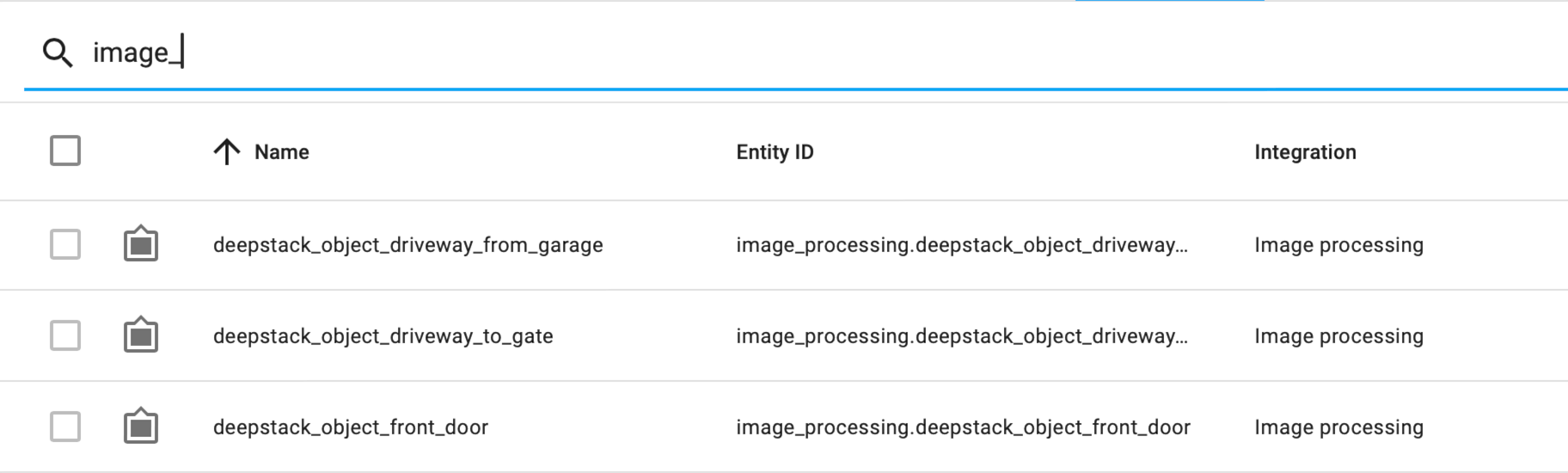
➜  ~ hass-cli service list 'image.*'
DOMAIN            SERVICE               DESCRIPTION
image_processing  scan                  Process an image immediately
unifiprotect      save_thumbnail_image  Request the latest motion thumbnail from a camera and write it to a file
➜  ~ hass-cli service call image_processing.scan \
  --arguments entity_id=image_processing.deepstack_object_front_door
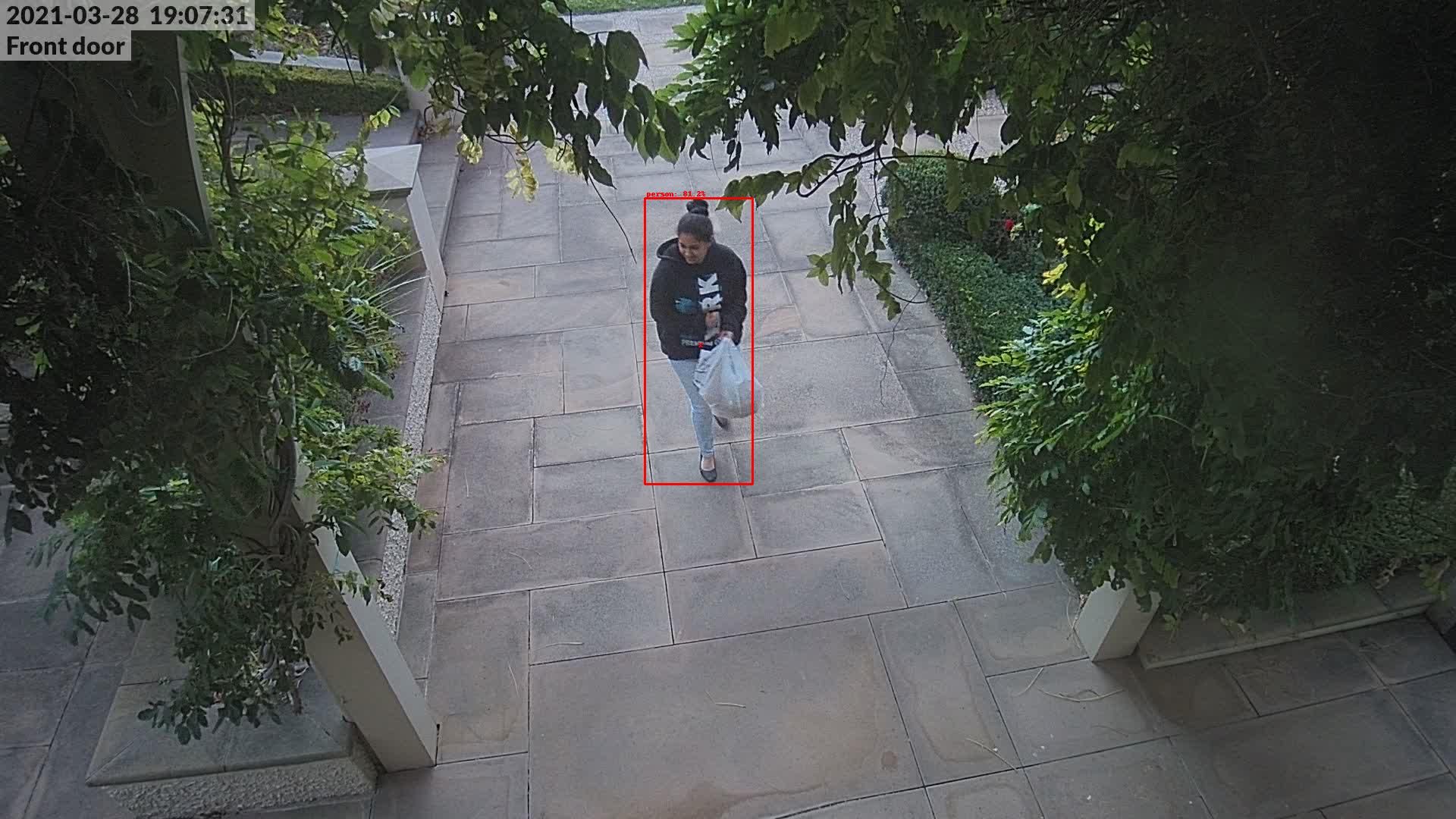
The
hass-cliguide can be found at https://www.home-assistant.io/blog/2019/02/04/introducing-home-assistant-cli/and https://github.com/home-assistant-ecosystem/home-assistant-cli
➜  ~ hass-cli --output=yaml state get \
image_processing.deepstack_object_driveway_from_garage

   -  entity_id: image_processing.deepstack_object_driveway_from_garage
      state: '2'
      attributes:
          targets:
             -  target: person
                confidence: 80.0
             -  target: animal
                confidence: 60.0
             -  target: vehicle
                confidence: 60.0
             -  target: car
                confidence: 40.0
          targets_found:
             -  car: 75.781
             -  bicycle: 78.125
          summary:
              car: 1
              bicycle: 1
          last_target_detection: 2021-03-28_17-24-23
          all_objects:
             -  bicycle: 10.596
             -  car: 13.574
             -  motorcycle: 15.112
             -  car: 37.085
             -  car: 75.781
             -  bicycle: 78.125
             -  person: 79.346
          save_file_folder: /media/cameras
          save_file_format: jpg
          save_timestamped_file: true
          always_save_latest_file: false
          unit_of_measurement: targets
          friendly_name: deepstack_object_driveway_from_garage
      last_changed: '2021-03-28T06:24:23.845385+00:00'
      last_updated: '2021-03-28T06:24:23.845385+00:00'
      context:
          id: 35bbda9d6a611fe994f5f53bc27b6826
          parent_id: 88ed121a9c18fe4dea8067f10ae5184b
          user_id:
showcase (TBC)
To plumb this together, one crafts a Home-Assistant automation. https://www.home-assistant.io/docs/automation/
Automations are made up of a trigger and an action. Optionally combined with a condition. For example;
(trigger) motion detected by Unifi Protect (camera/nvr)(condition) camera images contains a car or personANDall residents are off-site(action) Send actionable notification to mobile(s) with image/feed. Offer to turn on outside lights
I understand the Deepstack object detection is a sub-second process, nevertheless it consequently must occurs after the motion occurs, unless we’re running the service on a loop.
So perhaps our automation needs to be broken up into two;
Automation 1
(trigger) motion detected by Unifi camera(condition) rate limit to avoid nuisance air-breathing arthropods etc.(action) Scan camera image(s) for objects using Deepstack
Automation 2
(trigger) person/car detected by Deepstack(condition) camera images contains a car or personANDall residents are off-site(action) Send actionable notification to mobile(s) with image/feed. Offer to turn on outside lights
➜  ~ hass-cli event watch deepstack.object_detected

event_type: deepstack.object_detected
data:
    bounding_box:
        height: 0.408
        width: 0.13
        y_min: 0.338
        x_min: 0.405
        y_max: 0.746
        x_max: 0.535
    box_area: 0.053
    centroid:
        x: 0.47
        y: 0.542
    name: person
    object_type: person
    confidence: 91.992
    entity_id: image_processing.deepstack_object_front_door
    saved_file: /media/cameras/deepstack_object_front_door_2021-03-21_07-49-05.jpg
origin: LOCAL
time_fired: '2021-03-20T20:49:05.432364+00:00'
context:
    id: 6ee5bfb4266b6f367ceadda447231f82
    parent_id:
    user_id:
..to be continued (DRAFT)